
My GPU Workstation in My Pocket: Sleep, Wake and Work From My Phone
My favourite part of my homelab is a routine that sounds trivial:
- I put my PC to sleep from my phone before I leave the house.
- Wherever I am, I wake it up again from my phone.
- I keep working on my projects: with Claude Code, or with an agent running entirely on local models. I also generate images or music, all from the same phone.
The PC barely uses any power while I’m out. Nothing at home is exposed to the internet (here’s how). And I never have to think about which machine is answering me.
The piece that makes it work is a small web app I call the AI Hub.
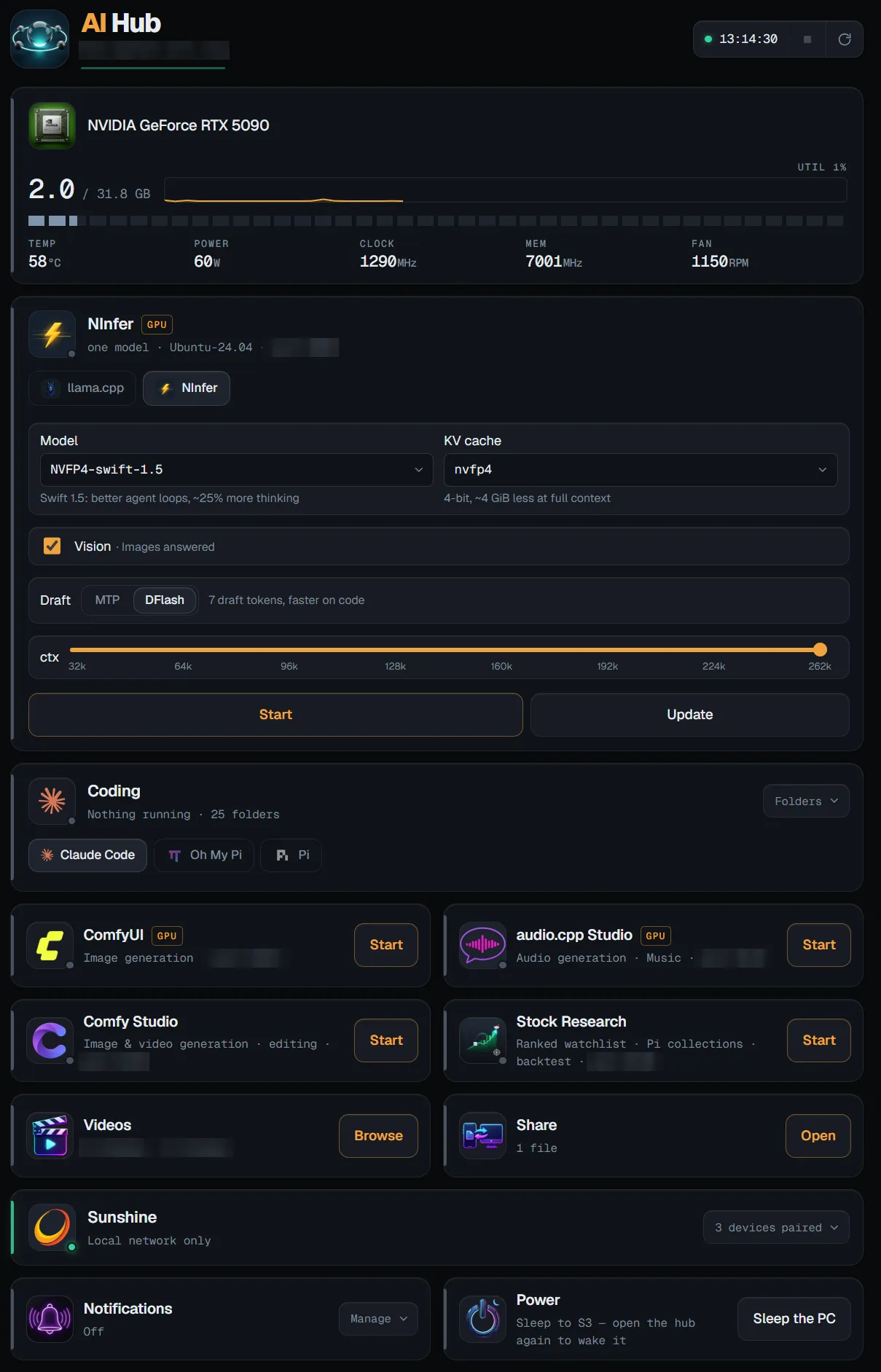
The hub on my phone. Tap to enlarge.
What’s on the dashboard
The hub runs on the PC (an RTX 5090 workstation) and is built for a phone screen. From top to bottom:
- The GPU. Memory in use, utilisation, temperature, power, clocks. Mostly so I can see whether something is still running before I start the next thing.
- The local LLM engine. One endpoint, served either by llama.cpp or by NInfer, an open-source inference engine I run in WSL for 4-bit (NVFP4) models. I pick the model, the KV-cache format, the context length (up to 262k tokens on one card) and the speculative-decoding mode, then press Start.
- Coding. Claude Code, Oh My Pi (omp) and pi, for any of my project folders. More on that below.
- ComfyUI and Comfy Studio for image and video generation and editing.
- audio.cpp Studio for making music.
- Videos. I can browse my films on the PC’s disks and stream them to the phone.
- Share. One folder that works in both directions: share a file from the phone’s share sheet and it lands on the PC, or pick up something the PC left there.
- Sunshine. Game streaming from the PC. Normally it only works inside my home network; when I’m away, I can open it up from here for a few hours (more on that below). New devices are paired from this card too.
- Power. Sleep the PC.
Each app card has a Start button, and once the app is running, the card opens the app’s own interface. Heavy apps are tagged GPU: they share one graphics card, and a large language model at full context leaves little room for anything else.
Working on projects from anywhere
This is the part I use most.
Claude Code. I choose a project folder on the hub and start a Claude Code remote-control session for it. Then I open the Claude app on my phone and pick that session. Claude works on the PC, with the PC’s files and tools, while I steer from wherever I am. If I’m at home later, I can carry on with the same session at the keyboard.
Local agents. omp and pi are coding agents that can run against my local LLM. They come without a client of their own, so the hub has its own chat view for them, with permission prompts and file viewing. Nothing leaves the house except the chat page itself: the model runs on my GPU, and the agent works on my disk.
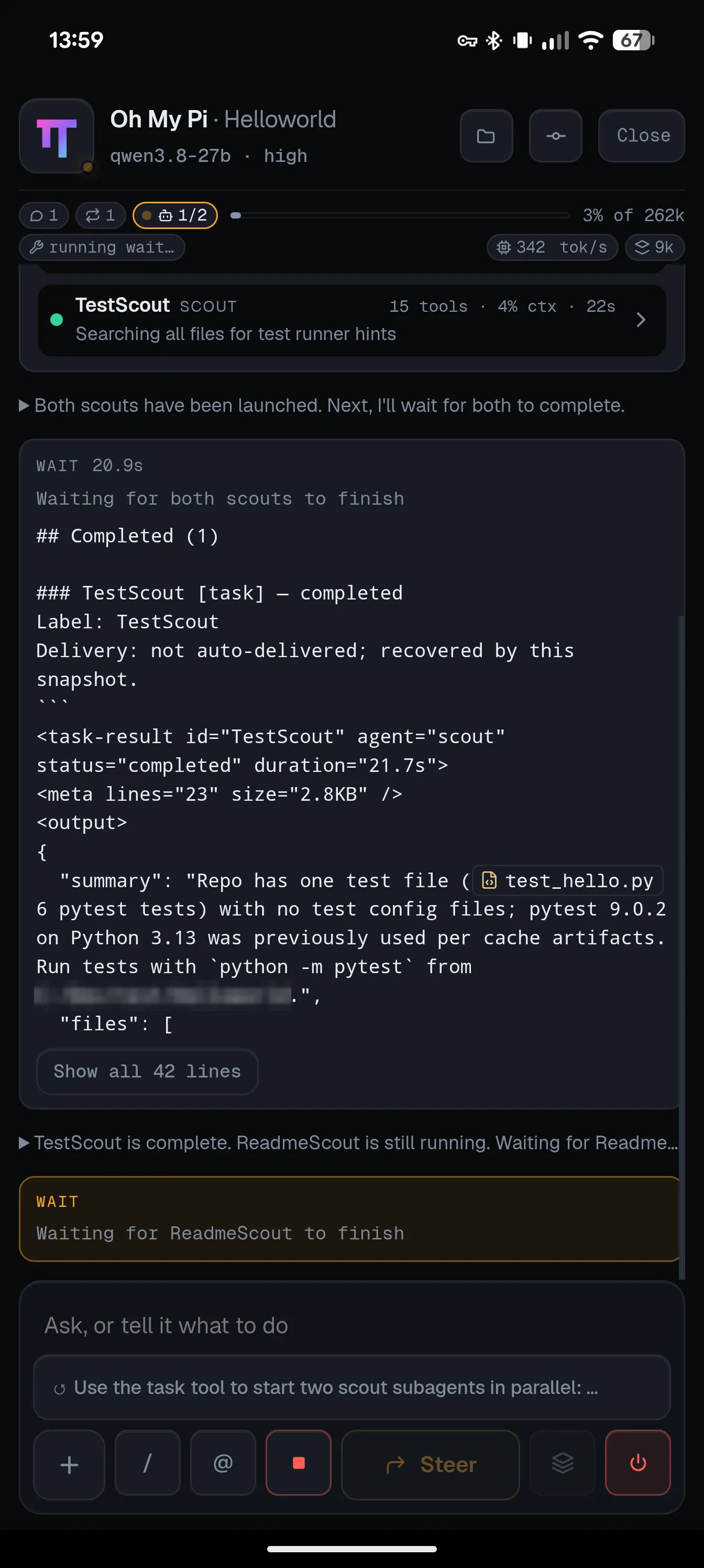
omp on a local 27B model, running two scout subagents in parallel. Tap to enlarge.
So my choice depends on the task: Claude for the hard problems, a local model for experiments, for privacy, or just to see how far local models have come.
Sleep and wake
The routine that started this whole project:
flowchart TB
    awake(["PC awake<br/>hub answering"])
    asleep(["PC asleep<br/>uses almost no power"])
    wake["Wake page<br/>on the Raspberry Pi"]

    awake -- "Sleep the PC<br/>(from the phone)" --> asleep
    asleep -- "open the hub:<br/>the PC doesn't answer" --> wake
    wake -- "Wake<br/>(Wake-on-LAN packet)" --> awake
The tricky part: a sleeping PC can’t wake itself, and it can’t serve a page saying it’s asleep. So the wake-up lives on another machine: the Raspberry Pi that is always on and also serves this site.
What happens when I open the hub on my phone while the PC sleeps:
sequenceDiagram
    participant Ph as Phone
    participant CF as Cloudflare
    participant PC as PC (asleep)
    participant Pi as Raspberry Pi

    Ph->>CF: open the hub
    CF->>PC: forward
    PC--xCF: no answer
    CF-->>Ph: wake page (from the Pi)
    Ph->>Pi: Wake
    Pi->>PC: magic packet
    Note over PC: wakes in 15–30 s
    PC->>Pi: heartbeat: "I'm up"
    Pi-->>Ph: hub is back
    Ph->>CF: open the hub
    CF->>PC: forward
    PC-->>Ph: the dashboard
On the phone it is a single icon. If the PC is up, the icon opens the hub. If it sleeps, Cloudflare notices that the PC doesn’t answer and shows the wake page instead. After the wake, the page hands me back to the hub on its own. Going the other way, Sleep the PC sends the hub page straight to the wake page.
A few details that took real effort:
- The PC reports to the Pi, not the other way round. The hub only accepts connections that arrive through its tunnel, so the Pi can’t ask it whether it’s up. Instead, the PC sends the Pi a heartbeat over the home network every 20 seconds.
- Sleep, not hibernation. In sleep (S3) the network card stays powered and listens for the magic packet. Hibernation is switched off.
- No surprise wake-ups. Windows Update once woke the PC at 4 a.m. on its own and left it at the login screen. Wake timers are now disabled; Wake-on-LAN is a different mechanism and isn’t affected.
- Never cached. The hub’s page and the wake page are both served
no-cache. A phone that keeps an old copy would show “unreachable” without ever asking Cloudflare, which would have redirected it.
How it’s protected
The hub can start programs on my PC, so access is strict:
- No open ports at home. The PC and the Pi each connect out to Cloudflare through a Cloudflare Tunnel. There is nothing to scan.
- One account. Cloudflare Access lets exactly one account in: mine. Everything is checked at Cloudflare’s edge before a request reaches either machine.
- Bounded actions. Claude Code sessions can only start in folders I’ve added as favourites, under a few project roots. The phone can’t start an agent in an arbitrary directory.
- Game streaming opens up only on demand, and closes by itself. Sunshine streams over UDP, which a tunnel can’t carry, so playing from outside needs real open ports. By default there are none. When I want to play away from home, one tap on the hub lets Sunshine open its ports on my router (via UPnP) for a limited time: three hours by default, eight at most. When the time is up, the hub closes them again, and putting the PC to sleep closes them early.
The full recipe for the tunnel and Access part, with the gotchas, is in Self-Hosting on a Raspberry Pi Without Opening a Port.
Why bother
A big GPU at home is wasted if you can only use it at your desk, and expensive if it runs all day. This setup gives me both: the machine sleeps whenever I’m not using it, and I can use all of it from anywhere: agents on my own models, image and music generation, my projects, my files.
And honestly, putting a PC to sleep from the bus stop and waking it from a café never stops being satisfying.