
threadfall: A Platformer Built and Tested by Agents
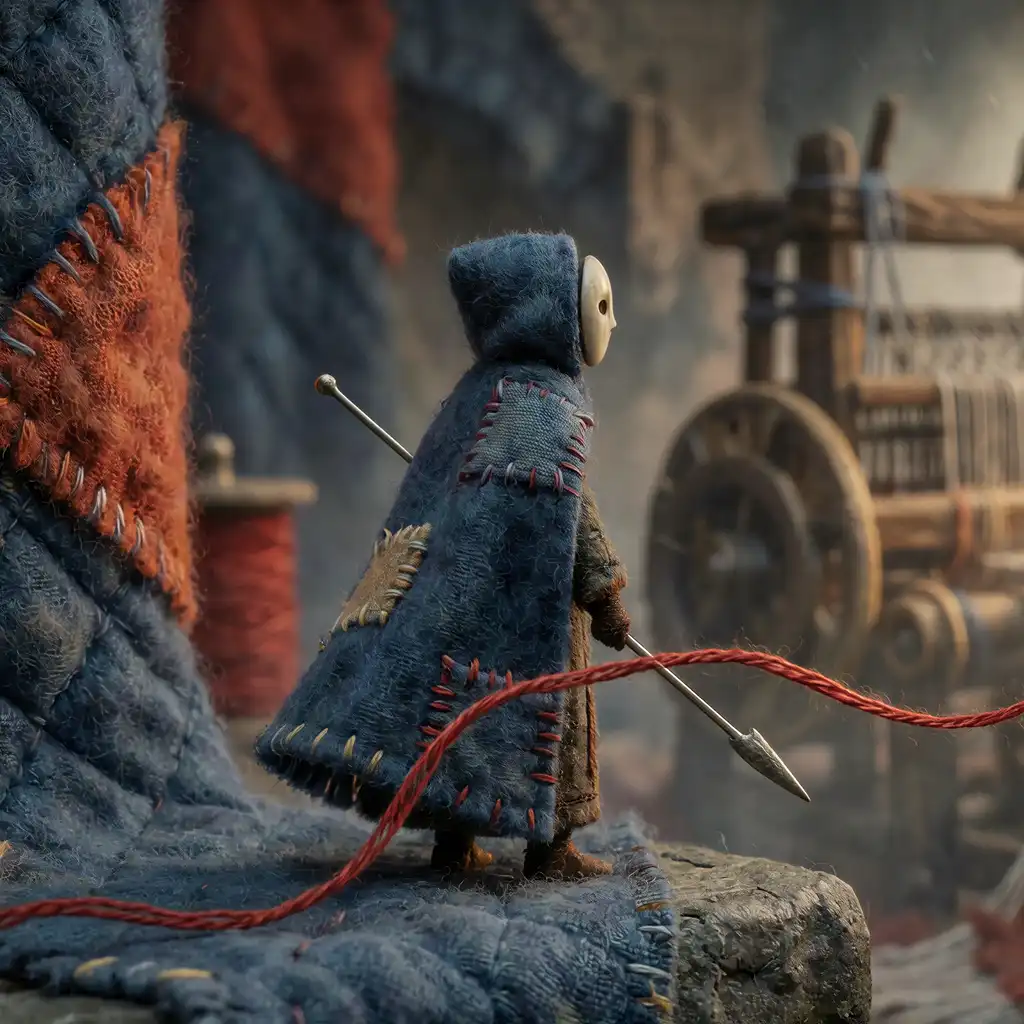
threadfall is a 2.5D precision platformer in the browser. You play Purl, a small felt puppet with a sewing needle, in a world made of cloth that is coming unstitched. It moves like Celeste: run, jump, wall jump, an eight-way dash. It borrows from Hollow Knight too: a down-strike off a pin or an enemy bounces you up and gives the dash back. There are eight chapters, about fifty rooms, two endings, a cutscene per chapter and a score.
It took two days. The first commit, a plan and no code, is from a Wednesday morning; the forty-fifth, a last bit of visual polish, is from Thursday evening. Claude Code wrote it. I set the direction, answered questions, played some of it and complained. Every picture, every cutscene and every music track was generated on my own PC, on one RTX 5090, through the AI Hub.
This post is about the part I find most interesting: the agent never plays the game, and none of its checks need me to. Everything an agent needs to know about whether a jump works, whether a room can be finished and how hard a trick is comes from a simulation it can run as a program. The rest of this post explains that simulation and what it makes possible, and ends with what it cannot do.
Why the agent does not play in a browser
The obvious approach is to give the agent a browser, let it press keys and look at screenshots. The plan rejected that before the first line of code, for four reasons:
- Timing. A browser automation round trip varies by several milliseconds, sometimes tens. A dash meant for frame 41 lands on 40 or 43, and two identical runs do not agree. A test that does not reproduce is not a test.
- Reaction. A language model takes seconds per step. The game cannot wait for it, and a game paused for it is a stepped simulation reached the slow way.
- Evidence. A wall jump is a trajectory, and whether it worked is a number: did the feet clear that ledge. A screenshot is one lossy frame of it, and the local model I wanted to use as well cannot read pictures at all.
- The automation tab. On my machine the browser tab an agent drives is a hidden tab, and Chrome throttles it. More on that at the end.
So the browser is only checked for what only a browser can show: the page boots, it draws, and key presses and gamepad buttons reach the game. Even those checks step the game one tick at a time and never play it in real time.
One rule: the simulation is pure
The whole game hangs on one folder, src/sim/. A tick is a function of four
things: the state before, the inputs of that tick, the room and the tuning.
It reads no clock, draws no random numbers, imports nothing from three.js or
the browser, and the state is plain data that can be copied with one call.
flowchart LR
    files["Text files<br/>rooms, tuning,<br/>input scripts"]
    sim["src/sim<br/>tick(state, input, room, tuning)<br/>120 times a second"]
    page["The page<br/>three.js draws it,<br/>keyboard and pad feed it"]
    node["Node<br/>tests, the tf CLI,<br/>the search"]
    editor["The in-game editor"]
    files --> sim
    sim --> page
    sim --> node
    editor -- "saves to" --> files
The details that make it work:
- A fixed tick of 120 Hz. The screen draws whatever its refresh rate is and interpolates between the last two ticks. 120 rather than 60 halves the delay from button to screen and doubles the resolution of every forgiveness window. On my 240 Hz monitor every tick is shown for exactly two refreshes.
- Whole-number positions on a fixed grid. A tile is 16 units, the player a 12 by 22 box that moves one unit at a time against the tiles, with the fraction carried over (this is how Celeste does it). Nothing tunnels through a wall, and every position is exact.
- No floating-point functions whose last bit can differ.
sin,cos,pow,atan2and the like are banned in the simulation. Angles come from eight- and sixteen-way tables.Math.sqrtis allowed, because IEEE 754 rounds it exactly. A test searches the folder for the banned names and fails if it finds one. - The renderer reads the simulation and never writes to it. Squash and stretch, dust, the cloak flapping, the camera, sound, rumble, the light of each chapter: all of it reacts to the simulation and none of it feeds back. Freeze frames, which do change when you can act, are counted in ticks inside the simulation.
- Tuning is in tiles and seconds. A jump is “3.5 tiles high, apex after 0.32 s”. One function converts it to units and ticks. A tuning file never has to change if the tick rate or the tile size does.
Two checks keep this honest. One runs the same 10,000 ticks of random input twice and compares state hashes. The other plays the same input script in Chrome and in Node and requires the same hash in both. That second one matters most: a run recorded in the browser is judged in Node.
What 120 ticks a second buys: forgiveness you can count
Precision platformers feel fair because they forgive. Two of the forgiveness systems are easiest to see drawn. These figures are not illustrations: they are the feet positions the simulation produced, tick by tick, in small rooms built for the purpose.
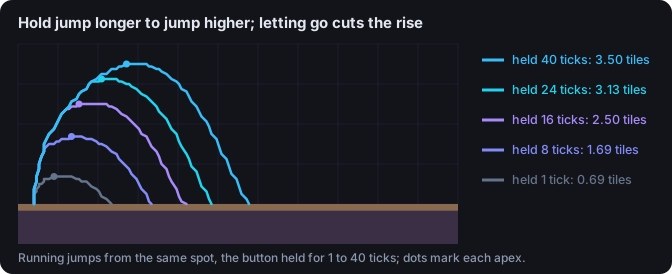
The jump is cut when the button is let go, so a tap is a hop and a full press is 3.5 tiles.
Coyote time lets you jump for a moment after walking off a ledge. The jump buffer remembers a press made just before landing and jumps on touchdown. In threadfall both are 0.1 s, which at 120 Hz is exactly 12 ticks. “Exactly” took a bug fix: the first version counted the tick on which you leave the ledge, so the window was one tick short. A test now pins both edges of each window, and a tuning change that moves one fails with the number it moved to.
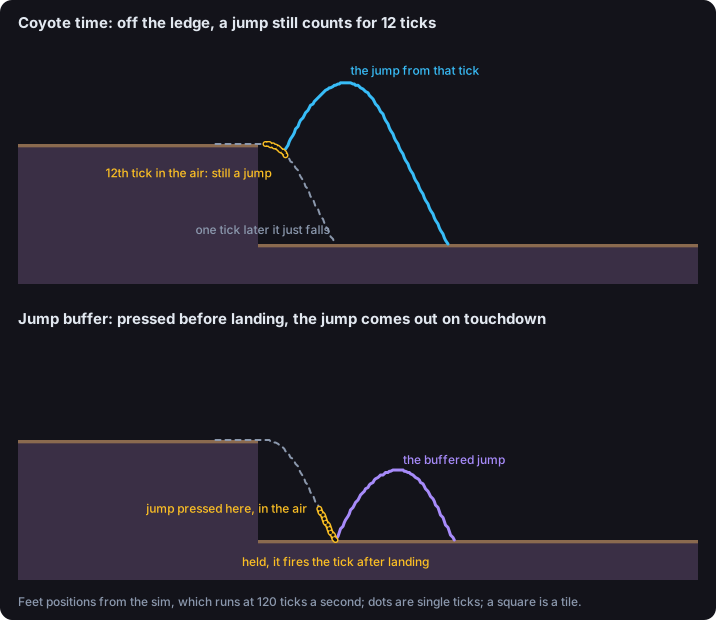
Coyote time and the jump buffer, as the simulation runs them.
The agent gets these numbers without drawing anything. tf is the game’s
command line, and tf arc measures the current tuning by running it:
$ npm run tf -- arc
run:     top speed 10.00 tiles/s, reached in 11 ticks (0.092 s)
jump:    apex 3.50 tiles, reached at 34 ticks (0.283 s), rising until 38 ticks (0.317 s)
hop:     apex 0.69 tiles (jump held 1 tick), airtime 30 ticks (0.250 s)
running: apex 3.50 tiles, clears 5.94 tiles in the air (feet to feet)
window:  coyote 12 ticks (0.100 s), buffer 12 ticks (0.100 s), corner 4 units
dash:    4.50 tiles in 18 ticks (0.150 s) after a 6 ticks (0.050 s) freeze
super:   a jump out of a ground dash clears 11.06 tiles (a running jump: 5.94)
pogo:    3.00 tiles up; strike reach 1.19 tiles, out for 22 ticks (0.183 s)
Every command takes --set, so “what breaks if the jump is 4.2 tiles?” is
one line, --set jumpHeight=4.2, with no file edited. It is the question
an agent asks most.
Input as text
The agent plays the game by writing down what to press. The format is borrowed from the tool-assisted speedrun community (CelesteTAS), with one addition: assertions, so a script is also a test. Each line is a number of ticks and the buttons held for them:
# room: t-pogo
# Across a spike pit too wide for jump + dash: jump, dash,
# pogo off the dummy (which refills the dash), dash again.
   2
  72 R               # to the edge
   1 R J
  25 R J
   1 R X             # dash right
  30 R
   1 R D S           # down-strike as the fall reaches the dummy
  14 R D
> pogo & refill & !death
  25 R
   1 R X             # the refilled dash
  80 R
> dash & !death
> grounded & tx >= 28
Every file in tests/tas/ runs with the test suite. The agent has three
ways to look at a run, all text, all short enough for a small model’s
context. tf run gives a one-line verdict. tf plot draws the path into
the room:
$ npm run tf -- plot tests/tas/pogo-chain.tas
pogo-chain.tas: passed, 252 ticks, 0 deaths
   0         1         2         3         4
   |    '    |    '    |    '    |    '    |
 6 ...................**********...............
 7 ..................**........*...............
 8 ..........*********..........*..............
 9 .........**..................**.............
10 ...S.....*....................*.............
11 ...*******^^^^^^^^^^^^^^^^^^...*E...........
12 ############################################
S start · E end · * path (hitbox centre) · ^ spikes
And tf trace prints the ticks around a moment, one row each. Here the
strike goes out on tick 132 and connects seven ticks later, on the dummy
(which the plot does not draw, at column 18), turning a fall into a rise and
giving the dash back:
$ npm run tf -- trace tests/tas/pogo-chain.tas --ticks 130-140
 tick  in      x     y      vx      vy  g  events
  130 R       257   121    2.53    0.56 .
  131 R       259   121    2.50    0.68 .
  132 RDS     262   122    2.47    0.79 .  strike
  133 RD      264   123    2.44    0.90 .
  ...
  138 RD      276   129    2.31    1.47 .
  139 RD      278   131    2.28   -2.81 .  refill pogo
The same script, played in the real page and captured frame by frame by
tf render (more on that tool below), looks like this:
tests/tas/pogo-chain.tas, rendered by the game itself, one frame every two ticks, played back at real speed. Nobody held a controller.
How hard is a trick? Measure it
“Is this jump too tight?” is usually a matter of opinion. Here it is a
number. tf window takes a script, shifts one moment of it tick by tick,
and reruns the whole thing headless for each shift. Shifting everything from
the strike onward asks how far the pogo can slip:
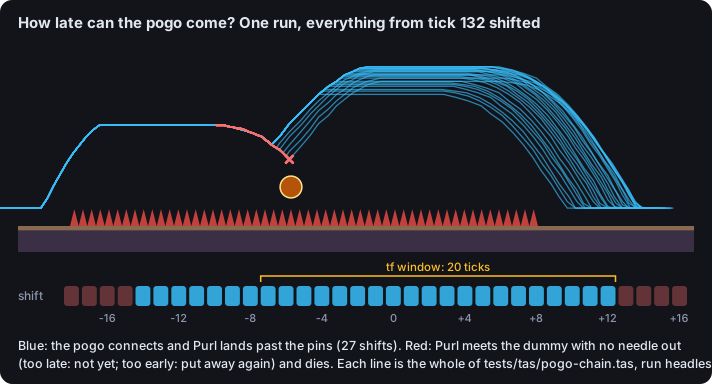
Every line is a complete run. Blue ones finish the room; red ones meet the dummy without the needle out.
tf window reports 20 ticks, a sixth of a second. While drawing this figure
I noticed the room is more forgiving than that: up to 14 ticks early still
works, because the strike stays out for 22 ticks and the fall carries Purl
onto the dummy at the same moment either way. The tool shifts the script’s
own > pogo check along with the inputs, and an early strike is checked
before the bounce has happened. So the honest reading is “20 ticks as this
script is written, 27 for the room”. It is the kind of thing you only find
when you look at the runs instead of the verdict.
There is a second question, which the tool answers with another flag: shift only the button press and leave the rest alone. That gives 13 ticks, because the down direction a pogo needs is held on the same line, and a strike moved earlier on its own becomes a side strike. Both numbers are right; they answer different questions, and the output says which one was asked.
Searching a room
The step that changed how rooms get built is tf solve. Because a state can
be copied and a tick is cheap (Node runs the simulation thousands of times
faster than real time), a plain search goes a long way.
It is a beam search over short input “macros”: runs of 6 or 24 ticks, jumps held 4, 14 or 34 ticks, a dash in each of the eight directions, a down-strike, and, in rooms that have them, catching and swinging on the thread hook. Each macro ends with every button released, so the next one starts on a fresh press. After each step, states that died are dropped, states that land in the same coarse bucket (a quarter tile of position, rough speed, dashes left) as one already seen are dropped, and only the 400 closest to the goal are kept.
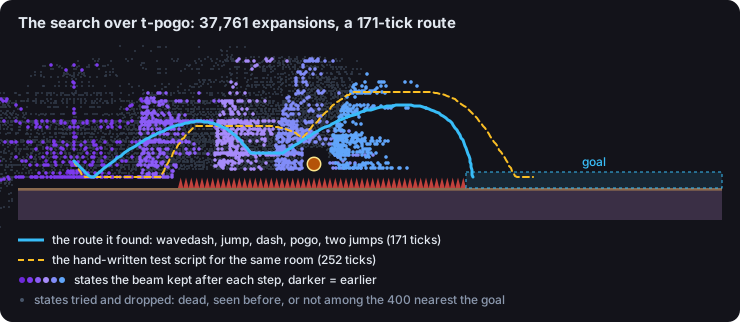
Each dot is a state the search reached. It spreads out from the start, the beam pulls it toward the goal, and it stops at the first state standing in it.
On this room it found a 171-tick route, where the script I had asked for took 252. It opens with a move nobody wrote down for it: a down-right dash into the floor and a jump out of it, a wavedash, which keeps the dash’s speed and lands with the dash refilled.
Three things about the search matter more than its speed:
- Its budget is a count, never a time. It stops after a fixed number of expansions and breaks ties in insertion order. The same room, tuning and options give the same route on any machine, so a result can go into a test, and a busy PC cannot make a test flaky.
- A room can mark places no route should reach. If the search gets there
anyway, that is a skip, a design bug, and it comes with the route that
does it.
--toaims the search at any rectangle instead of the goal, which is how the playground rooms (below) were checked station by station. - It finds things. Its very first result was a bug: a wall marked out of reach “without the dash” was climbed with a dash, because every new life started with one regardless of the tuning. In chapter 7 it found that a body dipping into a pit could pass under a gate and come up beyond it, which led to a rule for what lies below a room. The plan for that chapter has the sentence I would put on the box: “Every first draft was crossed some other way.”
Proving a chapter
A chapter is rooms placed on a map; an opening at a room’s edge leads into
whatever room sits there. tf chapter checks the map, then searches every
room from every respawn point to the way out, and every collectible spool
from its room:
$ npm run tf -- chapter c1
c1 "The Loose End": 6 rooms, map checked
  c1-01 to c1-02 from 3,16: 262 ticks (21580 expansions)
  c1-03 spool 2,4 from 2,14: 551 ticks (66433 expansions)
  c1-04 to c1-05 from 11,18: 275 ticks (21580 expansions)
  c1-06 to the goal from 3,21: 652 ticks (90580 expansions)
  ...
every room finishable from its entry, 6 spools reachable (5.4 s)
The second half of a proof is the one that took a failure to learn. A room built to teach the dash must be impossible without it, so the test suite tunes each verb away and requires the room that teaches it to fail:
$ npm run tf -- chapter c1 --set maxDashes=0
  c1-04 to c1-05 from 11,18: NOT FOUND in 26450 expansions; closest tile 31,25
  c1-04 spool 27,13 from 11,18: NOT FOUND in 52925 expansions; closest tile 26,15
  c1-05 spool 23,10 from 3,17: NOT FOUND in 150072 expansions; closest tile 24,16
3 not found (7.6 s)
Look at the expansion counts. The budget is 150,000. Where the search gave up at 26,450, it did not run out of budget; it ran out of states it had not seen. That is what makes “not found” a proof rather than a shrug. The last line is the other kind: it used the whole budget, so it only means “not found”, and nothing leans on it. The test requires the dash room to fail, and that one ran dry.
This half exists because c1-04, the dash room, first passed every check and was crossed without a dash: the search pogoed off the spikes in its gap, because spikes are pogoable. The gap is bottomless now. Later chapters teach things that are not tuning values (dye vats, lanterns, zippers), so their proofs change the room instead: the vats blanked out, the lanterns removed, a chasing flood sped up past what the search can outrun.
Where the agents went wrong
Claude Code built threadfall, but the tooling was designed from the start for a second, much smaller agent: omp running on Qwen3.8 27B on my own GPU through NInfer. That is why the output of every command fits on one screen, why rooms are ASCII instead of an editor format, and why nothing needs a picture.
On the first day it got three trial tasks, each in its own git worktree, graded by me re-running the tools rather than reading its report:
| Task | Time | Result |
|---|---|---|
| Raise the jump to 4.2 tiles, report what breaks and why | 2 min | Pass. It found six failures where I had predicted two, all correctly explained, and three of them exposed tests that quietly depended on the current tuning |
| Write a script that crosses a room with a super (a jump out of a ground dash) | 3 min | Pass, frame-exact |
| Design a spike pit crossable only by pogoing off two dummies | 21 min | Fail, reported as success |
The third one is the instructive one. Its route pogoed once, and the room could be crossed with no dummies at all, because the spike floor is itself a pogo surface. Its report said a single pogo “drops into the spikes” and no pogo “can’t clear the pit”. Both were false, and the checks passed, because no check tested what the room was for. The skill that teaches the tools got a “prove the intent” step: assert every use of the mechanic, read the events, solve a copy with the feature removed. In the first of two reruns that afternoon, the scripts were honest and the model now said it had checked a copy without dummies. That copy was solvable at the default settings when I ran it. The second rerun ran out of time with only a room.
To be fair to the model: I made the same mistake the next day with c1-04, the dash room crossed by pogo. The answer in both cases was a test, not a reminder.
Hands on it: the playground and “Copy tuning”
The simulation can prove a room possible. It cannot say whether it is fun, or whether the swing feels heavy. That part is mine.
When I played chapter 2 the first time, the thread hook’s swing flew too far. I found values I liked in the tester’s tuning panel (a few sliders on the swing’s speed and gravity), and before they became the defaults the chapter search was run again to confirm every room and both spools were still reachable. The same session turned up a bug only hands find: a press “did not come out” with the catch ring lit. It turned out the catch happened and was undone in the same tick, by a jump buffered from just before. Another one was a crimson thread on the cloak that hung stiff like a tail; on my 240 Hz monitor the rope simulation took four times as many damping steps per second as at 60 Hz. Those are things no headless check would have asked about.
To make that loop faster, there are four playground rooms, about 150
tiles long each, with one station per mechanic on a floor that runs the
whole way: jump heights, gaps of 4 to 12 tiles, a wall shaft, buttons to
swing on, dye vats, pincushions. Nothing kills except what is under test,
and Backspace rewinds ten seconds. They are in no chapter, so they appear
only in the level tester. Each station was checked reachable with
tf solve --to.
The public build at /games/threadfall/ includes the tester too, saving into the visitor’s own browser. Its Copy tuning button puts every changed value on the clipboard, old and new, then as JSON, so a value found in the browser can be pasted into the chat with the agent. Pasted values are not just committed: every chapter is proven again first, because a faster dash can open a skip and a weaker bounce can close a route.
The art, on one GPU
The look is felt: a stitched textile diorama, chosen from a comparison of three styles (felt, ink, cut paper) on four image models. Krea 2 drew the best felt, so it makes the backdrops, the title and the first frames of cutscenes. Qwen Image 2.1 is the model here that paints a real transparent background when asked, so it makes everything cut out.
Purl is not a sprite sheet. Image models cannot keep a figure the same across eight frames of a run cycle, so Purl is a puppet of parts, each rendered once, posed by code every frame: a hood with its mask, a cloak, a boot, a mitten. The cloak is a small grid bent as cloth, the trailing thread is a rope of sixteen points that also shows whether the dash is ready (crimson) or spent, and the feet move by distance run, so they never skate. The needle is plain geometry: every Qwen take laid it on a strip of felt.

Four of Purl's parts and the dummy, as the game loads them. Each is one render with transparency.
A cutout goes from prompt to game like this:
flowchart TB
    subgraph gpu ["On the GPU, through the hub"]
        direction LR
        A["Prompt<br/>fixed style string,<br/>one object"] --> B["Claim<br/>on the card"] --> C["ComfyUI<br/>Qwen Image 2.1,<br/>four seeds"]
    end
    subgraph repo ["In the repo"]
        direction LR
        D["Picker sheet<br/>alpha shown<br/>over purple"] --> E["picks.json<br/>the take, its size,<br/>clean the halo"] --> F["build.py<br/>crop to alpha,<br/>resize"]
    end
    subgraph game ["In the game"]
        direction LR
        G["public/art"] --> H["Posed in code<br/>every frame"] --> I["tf render<br/>a real frame<br/>to look at"]
    end
    gpu --> repo --> game
Two details carry most of the consistency. The style is a fixed string, pasted word for word into every prompt, and Purl is described in the same sentence every time; a style reworded is a style changed. And the render job and the pick are files in the repo, so any part can be made again with more seeds.
The cutscenes are short films from MiniMax H3, also run locally: the intro is three chained parts, 26 seconds, starting on the title picture so it opens on exactly what the title screen shows. Each clip was then enlarged four times with NVIDIA’s video super resolution, interpolated from 24 to 120 frames per second with RIFE (five frames per film frame, which divides evenly into 60, 120 and 240 Hz displays) and shipped as AV1 in WebM. The music is from Ace-Step, one looping track per chapter, usually rendered in three takes. I picked by ear; the agent cannot listen, so it checks loudness with ffmpeg and transcribes each take to catch stray vocals.
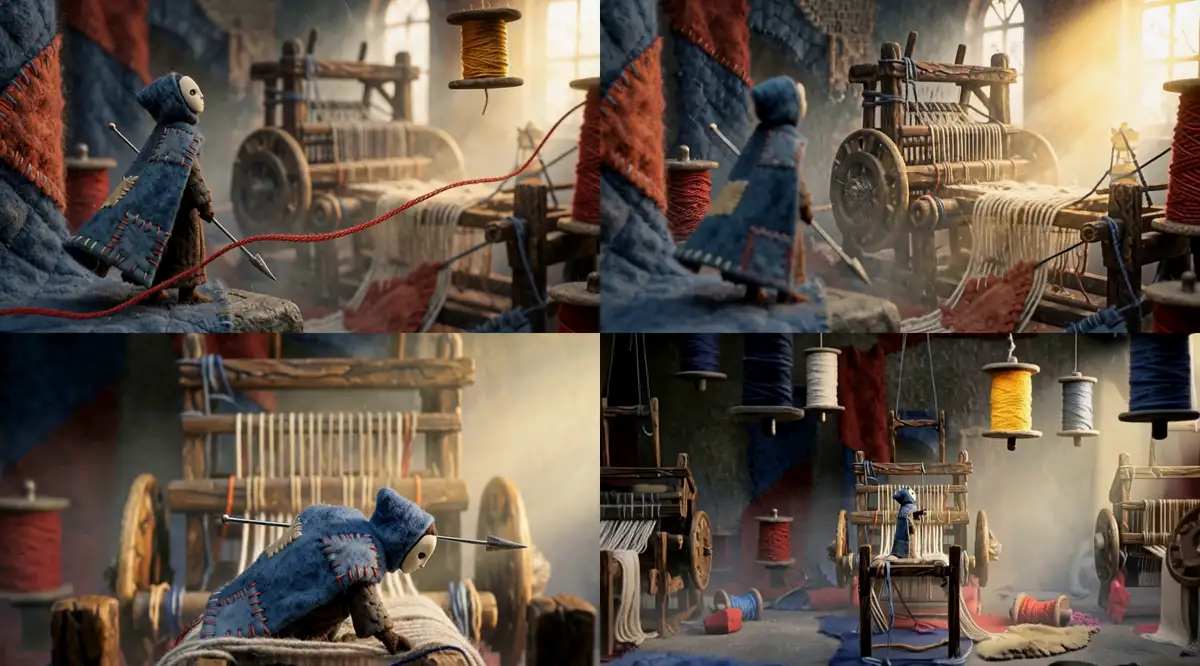
Frames from the intro, MiniMax H3 on the local GPU. The puppet in the clips is the model's idea of Purl, not the game's rig.
All of it ran on the same card that serves the local language models, and the hub decides who gets it: a render takes a claim, and only the hub unloads anything to make room. How that lending works is a post of its own.
Looking at frames without playing
tf render is the one tool that uses the real page. It opens the game
in a headless browser, steps it through a debug hook one tick and one drawn
frame at a time, and screenshots the canvas at the ticks asked for, as a
PNG strip. The page’s own canvas assembles the strip, so the tool needs no
image library. The same script always gives the same frames.
The agent uses it to check that new art reads in play, not just in the picker. The rule in the art skill is that a ledge must stay the clearest thing on screen. The first backdrops failed that and were pushed back, dimmed and hazed. A middle layer full of props that also exist in play needs to be darker, or it reads as something to touch.
What this cannot do
The approach has edges, and I would rather list them than have them found:
- Headless frames are stills of a stepped game. Headless Chromium on my PC has no WebGPU, so three.js falls back to WebGL 2 at 6 to 14 frames per second. That is fine for a picture. It says nothing about whether the full effects (bloom, light shafts, lint in the air) hold 120 frames per second on a real screen.
- The automation tab is throttled. When the agent drives my actual Chrome, the tab is hidden and Chrome holds it to about two frames per second, even for an empty page. The frame rate with effects could not be measured that way at all.
- Sound, rumble and feel are not in any test. The sound effects are synthesised from the simulation’s events and the pad rumbles on them; whether they feel right is unverified until someone holds the pad.
- Possible is not fun. Every room on every chapter’s main route is proven finishable from every respawn point, and every room proven to need what it teaches. Whether the rooms are too hard, too easy or simply dull is not something a beam search knows.
- Not everything has had hands on it. I played into chapter 5. As I write this, chapters 6 to 8 and the last round of visual work (the spools as turning geometry, new poses, the foreground threads, the map in the pause menu) have not been played by anyone.
- The model’s claims still need checking. The local agent writes good scripts and explains failures well, and it will also tell you it checked something it did not. The tools make checking cheap; they do not make it optional.
- Some numbers are provisional. The tile size has been “provisional until played with a controller” since the first day. The game also keeps replays of human runs as regression tests, by design, and so far I have kept none.
What I would keep
If I started another game tomorrow, the part I would copy first is not the search or the art pipeline. It is the rule that one pure folder decides everything, and that the picture only reads it. Every tool in this post follows from that: scripts, traces, windows, the search, the proofs, the rewind in the tester and the replay that plays the same in Node as in Chrome. Agents are good at writing code and poor at judging whether a game feels right. A deterministic simulation turns much of “does it work” into questions they can answer by running something, and leaves the questions that need a person clearly marked as such.
For the habits behind working with an agent this way, see the primer. The game is at captain-arni.org/games/threadfall/, keyboard or controller.